Appearance
组建基础
组件让我们能讲UI划分为独立的,可重复使用的部分.并且可以对每个部分进行单独的思考.在实际应用中,组件尝尝被组织成一个蹭蹭嵌套的树状结构: 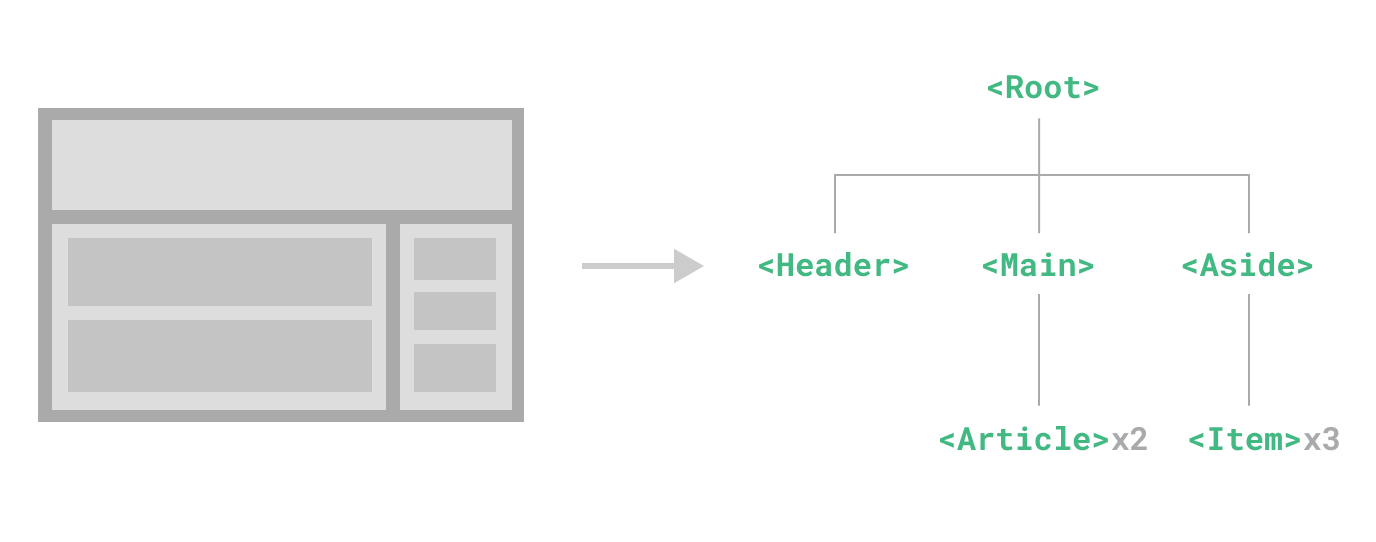
Vue实现了自己的组件模型让我们可以在每个组件内封装自定义内容与逻辑.
定义一个组件
当使用构建步骤时,一般将Vue组件定义在一个单独的.vue文件中,这杯叫做单文件组件(SFC)
html
<script setup>
  import { ref } from 'vue'

  const count = ref(0)
</script>

<template>
  <button @click="count++">You clicked me {{ count }} times.</button>
</template>当不使用构建步骤时,一个Vue组件以一个包含Vue特定选项的JavaScript对象来定义
javascript
import { ref } from 'vue'

export default {
  setup() {
    const count = ref(0)
    return { count }
  },
  template: `
    <button @click="count++">
      You clicked me {{ count }} times.
    </button>`,
  // 也可以针对一个 DOM 内联模板:
  // template: '#my-template-element'
}这里的模板是一个内联的JavaScript字符串,Vue将会在运行时编译它.你也可以使用id选择器来指向一个元素(通常是原生的<template>元素),Vue将会使用其内容作为模板来源
上面的例子中定义了一个组件,并在一个.js文件里默认导出了它自己,但也可以通过具名导出在一个文件中导出多个组件
使用组件
要使用一个组件,首先要在父组件中导入它
vue
<script setup>
import ButtonCounter from './ButtonCounter.vue'
</script>

<template>
  <h1>Here is a child component!</h1>
  <ButtonCounter />
</template>通过<scipt setup>,导入的组件都在模板中直接可用
组件可以被多次复用
html
<h1>Here is a child component!</h1>
<ButtonCounter />
<ButtonCounter />
<ButtonCounter />
多次复用一个组件时,每个组件都是单独的实例,他们都各自维护着自己的状态
在单文件组件中,推荐使用PascalCase的命名规则,以此来与原生的HTML元素区分
传递props
父组件通过Props向子组件传递数据.
- 在父组件中的子组件标签上声明注册
- 在子组件内部通过
defineProps来接收
defineProps是一个仅在<script setup>中可用的编译宏命令,不需要显式的导入.声明的props会自动暴露给模板,defineProps会返回一个包含传递给组件的所有props的对象
javascript
const props = defineProps(['title'])
console.log(props.title)选项是API中,必须以props选项的方式声明,props对象会作为setup()函数的第一个参数被传入
javascript
export default {
  props: ['title'],
  setup(props) {
    console.log(props.title)
  },
}一个组件可以有任意多的props,默认情况下所有props都接受任意类型的值/
当一个props被注册以后,可以像自定义attribute的形式传递数据给它
html
<BlogPost title="My journey with Vue" />
<BlogPost title="Blogging with Vue" />
<BlogPost title="Why Vue is so fun" />
监听事件
在父组件中,有时候需要传递一些信息给子组件,比如子组件中展示的内容,字体的大小等等
- 在父组件中子组件的标签上通过
v-bind或:绑定自定义的props属性,将要传递的内容绑定
html
<!-- 父组件 Parent.vue -->
<template>
  <Child :title="pageTitle" :count="count" />
</template>

<script setup>
  import { ref } from 'vue'
  import Child from './Child.vue'

  const pageTitle = ref('Vue 3 组件通信')
  const count = ref(0)
</script>- 在子组件中,
通过defineProps接收父组件传递来的内容
html
<!-- 子组件 Child.vue -->
<template>
  <h2>{{ title }}</h2>
  <p>计数: {{ count }}</p>
</template>

<script setup>
  const props = defineProps({
    title: {
      type: String,
      required: true,
    },
    count: {
      type: Number,
      default: 0,
    },
  })
</script>3.子组件中通过内置的$emit或defineEmits宏向父组件传抛出事件
html
<button @click="handleClick">来自父组件的消息:{{msg}}</button>
<button @click="$emit('hear','知道了')">来自父组件的消息:{{msg}}</button>

<script setup>
  defineProps({
    msg: {
      type: String,
      required: true,
    },
  })
  const emit = defineEmits(['hear'])
  function handleClick() {
    console.log('知道了')
    emit('hear', '马上来')
  }
</script>- 父组件中通过监听
hear事件来接收子组件传递来的内容
html
<ChildButton :msg="'该吃饭了'" @hear="handleHear" />如果没有使用<script setup>语法糖,需要使用emits选项来声明组件会抛出哪些事件
javascript
export default {
  emits: ['enlarge-text'],
  setup(props, ctx) {
    ctx.emit('enlarge-text')
  },
}
通过插槽来分配内容
有时候我们也希望能和HTML元素一样,在组件中插入内容,可以通过Vue的<slot>元素来实现
html
<AlertBox> Something bad happened. </AlertBox>
<!-- AlertBox.vue -->
<template>
  <div class="alert-box">
    <strong>This is an Error for Demo Purposes</strong>
    <slot />
  </div>
</template>在这个示例中,<slot>元素将会被替换为父组件中<AlertBox>标签内的内容
动态组件
当我们希望在不同的状态下能动态的切换对应的组件,可以使用<component>元素和特殊的is属性来实现
html
<template>
  <button @click="currentTab = 'TabA'">Tab A</button>
  <button @click="currentTab = 'TabB'">Tab B</button>
  <component :is="currentTab"></component>
</template>
<script setup>
  import { ref } from 'vue'
  import TabA from './TabA.vue'
  import TabB from './TabB.vue'
  const currentTab = ref('TabA')
</script>在这个例子中,is的值可以是
- 被注册的组件名
- 被导入的组件对象
通过is动态切换组件式,被切换的组件会被卸载掉,然后再重新挂载新的组件,因此如果组件内部有状态,那么状态将会丢失,针对这种情况,可以是使用<KeepAlive>组件来缓存组件的状态
DOM内模板解析注意事项
如果在DOM中直接书写Vue模板(在JavaScript中直接定义模板),由于浏览器的一些原生HTML限制,需要注意一些事项
一下这些情况不用考虑这些限制
- 使用单文件组件
- 内联模板字符串 (例如 `template:'...')
<script type="text/x-template">元素
大小写区分
浏览器在解析DOM时会忽略大小写全部解析成小写,这就意味着无论是组件名称,props名称还是绑定的事件名称,都需要转化为对应的短横线形式:
javascript
// JavaScript 中的 camelCase
const BlogPost = {
  props: ['postTitle'],
  emits: ['updatePost'],
  template: `
    <h3>{{ postTitle }}</h3>
  `,
}
html
<!-- HTML 中的 kebab-case -->
<blog-post post-title="hello!" @update-post="onUpdatePost"></blog-post>
闭合标签
在Vue模板中,所有的元素必须闭合,否则会报错,例如<div>必须写成<div></div>或者<div />,不过Vue模板解析器支持任意标签使用/>来闭合,例如<div />和<div></div>是等价的.然而在DOM模板中,必须显示的写出闭合标签
html
<!-- Vue 模板 -->
<template>
  <div />
</template>
<!-- DOM 模板 -->
<div></div>因为HTML只允许一小部分特殊的元素省略闭合标签,其他元素如果没有显式的写出,会认为标签没有关闭.
元素位置限制
HTML元素对放在其中的元素类型有限制,比如: <ul>、<ol>、<table>、<select>等元素只能包含<li>、<tr>、<option>等特定的元素, 对应的某些元素只有放在特定的元素中时才会被显示
html
<table>
  <blog-post-row></blog-post-row>
</table>这里自定义的组件会被视为无效内容忽略,这种情况可以使用is属性来解决这个问题
html
<table>
  <tr is="vue:blog-post-row"></tr>
</table>
TIP
is使用在原生HTML元素上时,Vue会将其作为普通的HTML元素进行解析,而不是组件,所以必须加上vue:前缀才可以被解析为一个Vue组件, 这是为了避免和原生的自定义内置元素混淆