Appearance
插槽
插槽内容与出口
组件能够接收任意类型的JavaScript值作为props,也可以接收一些模板片段,在自身的组件中进行渲染.传递的模板片段就是插槽的内容,而组件内部渲染的位置就是插槽的出口.
html
<FancyButton>
  <!-- 插槽内容 -->
  Click me!
</FancyButton>
html
<!-- FancyButton 组件的模板 -->
<button class="fancy-btn">
  <slot></slot>
</button><solt>元素时一个插槽出口(slot outlet),表示了父元素提供的插槽内容将在哪里渲染
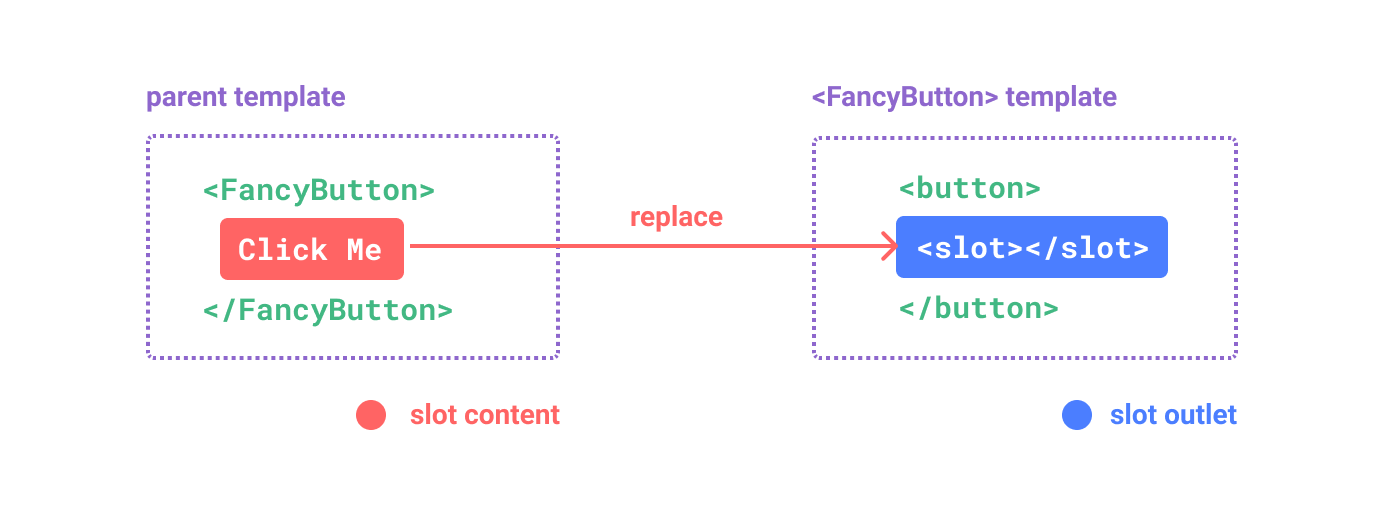
最终渲染结果为:
html
<button class="fancy-btn">Click me!</button>通过使用插槽,<FancyButton>仅负责渲染外层的<button>元素,而插槽内容Click me!则由父组件提供. 可以类比下面的代码来理解其概念
javascript
// 父元素传入插槽内容
FancyButton('Click me!')

// FancyButton 在自己的模板中渲染插槽内容
function FancyButton(slotContent) {
  return `<button class="fancy-btn">
      ${slotContent}
    </button>`
}
插槽内容可以是任意合法的模板内容,不局限于文本.
html
<FancyButton>
  <span style="color:red">Click me!</span>
  <AwesomeIcon name="plus" />
</FancyButton>
渲染作用域
插槽内容可以访问到父组件的数据作用域,因为插槽内容本身是在父组件模板中定义的
html
<span>{{ message }}</span>

<FancyButton>{{ message }}</FancyButton>插槽内容无法访问子组件的数据.Vue模板中的表达式只能访问其定义时所处的作用域,也就是说:父组件模板中的表达式只能访问父组件的作用域; 子组件模板中的表达式只能访问子组件的作用域.
默认内容
在外部没有指定时,可以为插槽指定默认内容
html
<button type="submit">
  <slot>
    <!-- 默认内容 -->
    Submit
  </slot>
</button>
默认内容会在插槽被显示提供内容时被覆盖
具名插槽
一个组件中,可以包含多个插槽出口.
html
<div class="container">
  <header>
    <!-- 标题内容放这里 -->
  </header>
  <main>
    <!-- 主要内容放这里 -->
  </main>
  <footer>
    <!-- 底部内容放这里 -->
  </footer>
</div>对于这种场景,<slot>元素需要使用name属性来定义插槽的名称,为插槽分配唯一的ID,确定每一处要渲染的内容. 这样的插槽被成为具名插槽
html
<div class="container">
  <header>
    <slot name="header"></slot>
  </header>
  <main>
    <slot></slot>
  </main>
  <footer>
    <slot name="footer"></slot>
  </footer>
</div>在父组件中使用v-slot指令来指定插槽内容应该渲染到哪个插槽出口中,也可以简写为#,,插槽内容应该放在<template>元素中,<template>元素是Vue模板中的虚拟元素,不会渲染到页面上.
html
<BaseLayout>
  <template v-slot:header>
    <!-- header 插槽的内容放这里 -->
  </template>
  <template #footer> </template>
</BaseLayout>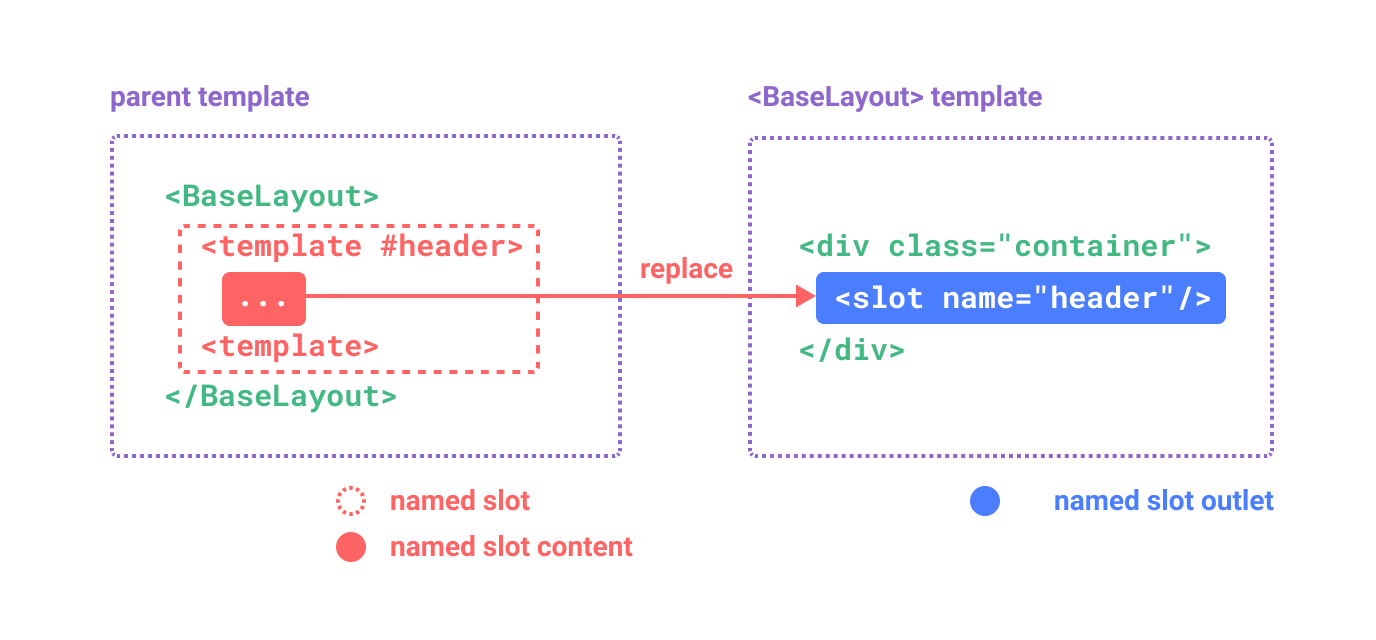
当组件同时接收默认插槽和具名插槽时,所有位于顶级的非<template>元素都会被视为默认插槽的内容
html
<BaseLayout>
  <template #header>
    <h1>Here might be a page title</h1>
  </template>

  <!-- 隐式的默认插槽 -->
  <p>A paragraph for the main content.</p>
  <p>And another one.</p>

  <template #footer>
    <p>Here's some contact info</p>
  </template>
</BaseLayout>
条件插槽
插槽定义以后就会被渲染在最终的页面上,但有时候我们需要根据内容是否被传入了插槽来决定是否渲染,这时候可以结合$slots对象与v-if指令来实现
html
<template v-if="$slots.header">
  <header>
    <slot name="header"></slot>
  </header>
</template>
动态插槽名
动态指令参数在v-slot上也是有效的,因此可以用来定义动态的插槽名
html
<base-layout>
  <template v-slot:[dynamicSlotName]> ... </template>
  <template #[dynamicSlotName]> ... </template>
</base-layout>
作用域插槽
上面在渲染作用域中我们说,插槽的内容无法访问到子组件的状态.但是如果插槽的内容想要同时使用父组件和子组件域内的数据,可以像对组件传递props一样想插槽的出口上传递 attribute
html
<!-- <MyComponent> 的模板 -->
<div>
  <slot :text="greetingMessage" :count="1"></slot>
</div>
默认插槽传递数据
html
<MyComponent v-slot="slotProps"> {{ slotProps.text }} {{ slotProps.count }} </MyComponent>这里默认插槽传递了text和count属性,父组件中在使用这个具有插槽的子组件时,通过v-slot指令的值来接收子组件传递的属性,v-slot的值是一个对象,包含了子组件传递的属性
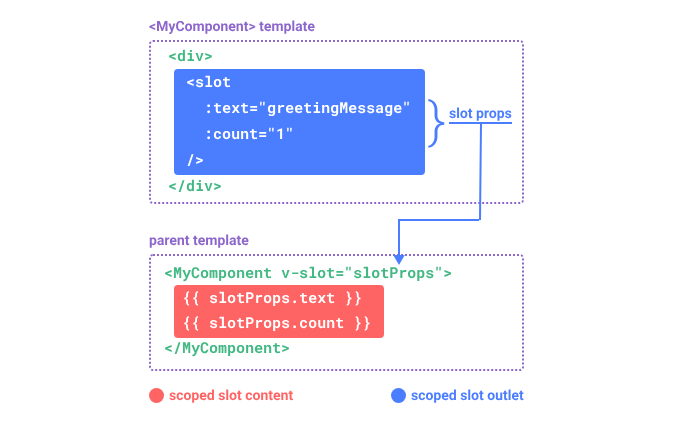
这里可以借助父组件向子组件传值来理解,只不过这次数据的方向是反的,是插槽绑定的值传递到了父组件,提供给父组件使用
具名插槽传递数据
插槽props可以作为v-slot指令的值被访问到:v-slot:slotName="slotProps"
html
<MyComponent>
  <template #header="headerProps"> {{ headerProps }} </template>

  <template #default="defaultProps"> {{ defaultProps }} </template>

  <template #footer="footerProps"> {{ footerProps }} </template>
</MyComponent>向具名插槽中传入props
html
<slot name="header" message="hello"></slot>需要注意的是,name是一个Vue特别保留的 attribute,如果使用name作为插槽的props名称,将会导致意料之外的行为,所以建议使用其他名称
如果同时使用了具名插槽和默认插槽,需要为默认插槽使用显示的<template>标签,尝试为组件添加v-slot指令将导致编译错误,这是为了避免因默认插槽的的props作用域而困惑:
html
<!-- <MyComponent> template -->
<div>
  <slot :message="hello"></slot>
  <slot name="footer" />
</div>
错误示例:
html
<!-- 该模板无法编译 -->
<MyComponent v-slot="{ message }">
  <p>{{ message }}</p>
  <template #footer>
    <!-- message 属于默认插槽,此处不可用 -->
    <p>{{ message }}</p>
  </template>
</MyComponent>
正确示例:
html
<MyComponent>
  <!-- 使用显式的默认插槽 -->
  <template #default="{ message }">
    <p>{{ message }}</p>
  </template>

  <template #footer>
    <p>Here's some contact info</p>
  </template>
</MyComponent>
高级列表组件示例
这里有一个列表组件:
html
// FancyList.vue
<script setup>
  import { ref, onMounted } from 'vue'

  const props = defineProps({
    apiUrl: String,
    perPage: Number,
  })

  const items = ref([])
  const currentPage = ref(1)

  const fetchData = async () => {
    const res = await fetch(`${props.apiUrl}?page=${currentPage.value}&per_page=${props.perPage}`)
    items.value = await res.json()
  }

  onMounted(fetchData)
</script>

<template>
  <ul>
    <li v-for="(item, index) in items" :key="index">
      <!-- 将整个item对象作为插槽prop向下传递 -->
      <slot name="item" v-bind="item"></slot>
    </li>
  </ul>
</template>
在父组件中使用这个列表组件
html
<FancyList :api-url="url" :per-page="10">
  <template #item="{ body, username, likes }">
    <div class="item">
      <p>{{ body }}</p>
      <p>by {{ username }} | {{ likes }} likes</p>
    </div>
  </template>
</FancyList>父组件将数据的获取和列表框架的渲染交给了FancyList组件,而列表组件将Item的渲染通过插槽暴露给父组件决定
无渲染组件
上面的<FancyList>组件封装了一些可复用的逻辑(数据获取,分页)和视图结构输出,但是夜间部分视图输出(Item项的渲染)交给了消费者组件来处理
扩展一下,如果有一个组件只包含逻辑而不渲染内容,视图输出完全交给消费者组件来处理,这样的组件成为无渲染组件